
What Is ViGEmBus Driver Software?
ViGEmBus is infrastructure, not a controller settings app.
When people ask ‘what is ViGEmBus driver software,’ the short definition is a Virtual Gamepad Emulation Bus for Windows. A bus driver can expose one or more devices to the operating system. ViGEmBus uses that mechanism to emulate well-known USB game controllers entirely in software. Its official repository describes it as a Windows kernel-mode driver for emulating familiar USB game controllers.
A normal game expects a physical controller that speaks a known protocol. Controller utilities often need to translate input from a different device, combine inputs or make remote input look local. Instead of modifying every game, the utility asks ViGEmBus to create a virtual controller. Windows and the game then treat that virtual device much like supported hardware.
The official project supports virtual Microsoft Xbox 360 and Sony DualShock 4 controllers. That does not mean ViGEmBus configures every physical controller. The client application decides what input to read, how to map it and which virtual device to create. ViGEmBus supplies the low-level device layer.
How ViGEmBus creates a virtual gamepad
The process has three distinct parts. First, a client program reads a real controller, keyboard, network stream or another input source. Second, that program uses the ViGEm client libraries and bus driver to submit controller state. Third, Windows exposes a virtual Xbox 360 or DualShock 4 controller to games and other applications.
This design avoids application-specific proxy DLLs and API hooks. From the game's point of view, a supported controller is present. That is why a missing bus can produce an error before a controller tool enables gamepad output: the app can read your physical input but cannot create the virtual device required by the game.
The driver runs at kernel level, while the controller application normally runs in user space. That separation is powerful but also makes download provenance important. A kernel driver receives deeper system access than an ordinary portable app, so use the original publisher's signed release rather than a repackaged driver bundle.
| Layer | Job | Example |
|---|---|---|
| Input/client app | Reads and maps the real input | DS4Windows or BetterJoy |
| ViGEmBus | Creates and maintains the virtual device | Nefarius Virtual Gamepad Emulation Bus |
| Windows/game | Detects a familiar controller protocol | Virtual Xbox 360 or DualShock 4 gamepad |
Which programs use ViGEmBus?
The official README lists many known users of the framework, including DS4Windows, BetterJoy, XOutput, Parsec, InputMapper, x360ce version 4 and Microsoft RdpGamepad. That list is not exhaustive. A utility may install ViGEmBus as a prerequisite, include it during setup or ask you to install it separately.
DS4Windows is one of the most common reasons people find the driver on a PC. It can translate a PlayStation controller into a virtual Xbox controller for games with better XInput support. BetterJoy uses virtual output for Nintendo controllers. Remote-control and streaming software can also create a local virtual gamepad from input received over a network.
Removing the driver does not necessarily uninstall the client application. Instead, that application's virtual-controller feature may stop working and display a message such as ‘ViGEmBus is not installed or running.’ Before removal, identify which controller, streaming or automation apps are installed and whether you still use their gamepad output.
- Controller remapping and compatibility tools
- Remote gamepad and game-streaming software
- Testing, replay and automated game-input tools
- Applications that translate unsupported hardware into XInput or DS4 output
Why is ViGEmBus on my PC?
In most cases, you or another user installed software that depends on virtual gamepads. The driver may have been added silently as part of that software's installer, which can make it feel unfamiliar later. Nefarius explicitly notes that some programs bundle the bus with or without a separate user-facing driver step.
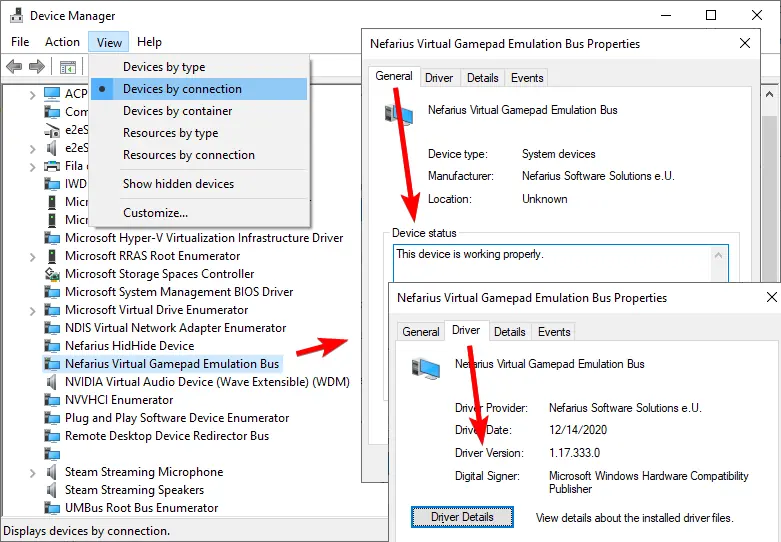
Open Windows Installed apps and search for ‘Nefarius’ or ‘Emulation.’ Then review controller utilities, remote-play tools and game-streaming applications installed around the same time. Device Manager can confirm the driver itself: choose View, select Devices by connection and look for Nefarius Virtual Gamepad Emulation Bus under System devices.
Finding the entry is not automatically evidence of malware. The important checks are publisher, source and whether you recognize a dependent application. If the entry has an unexpected publisher, appears as an unsigned unknown driver or came from an unrelated archive, do not assume it is the original ViGEmBus package.
Do you need ViGEmBus?
Keep the driver when an application you actively use requires virtual Xbox 360 or DualShock 4 output. It consumes no separate desktop workspace and normally stays in the background until a client creates a device. If your controller tool is working, removing a required bus creates inconvenience without providing a meaningful performance benefit.
You probably do not need it if you no longer use any controller remapper, remote-input tool or application that lists ViGEmBus as a dependency. You can uninstall it through Windows and reinstall the final official release later if an application asks for it again. Create a restore point before deep driver cleanup, but a normal Apps removal usually does not require special tools.
Do not remove the driver solely because the project is retired. End of life means it no longer receives updates, not that every existing installation suddenly becomes harmful. The practical decision is whether your software still depends on it and whether you are using the final release without the old updater.
| Situation | Recommended action |
|---|---|
| DS4Windows or another app uses virtual output | Keep ViGEmBus and verify version/source. |
| No controller or remote-input apps remain | Normal uninstall is reasonable. |
| Multiple bus entries appear | Follow a clean uninstall and reinstall process. |
| Unknown or unsigned publisher | Stop and investigate the file source before trusting it. |
Supported systems and end-of-life status
ViGEmBus 1.17 and later targets Windows 10 and Windows 11 in x86, amd64/x64 and ARM64 builds. The final 1.22.0 release packages those architectures in one executable. Windows Server may work, but the project does not officially support it. macOS and Linux cannot use this Windows kernel driver, and there is no ViGEmBus AppImage.
The project was retired after a trademark agreement and archived in 2023. The official end-of-life statement says existing installations continue to function, but older updater components needed attention because the former update domain was transferred. Version 1.22.0 removed the updater entirely. Users on older releases should upgrade to the final official setup or follow the official legacy-updater guidance.
Retirement also means new Windows changes will not be addressed by this project. Keep expectations realistic: the final installer is the correct historical release, but it does not carry a promise of future compatibility or support.
Driver, installer and client: three different layers
The ViGEmBus driver is the Windows device layer that lets approved software create a virtual Xbox 360 or DualShock 4 controller. The installer is only the package that registers that driver; it is not a separate gamepad application.
DS4Windows, BetterJoy, Sunshine and Apollo are client applications that request virtual output from Windows. You do not copy the ViGEmBus driver into a BetterJoy folder. If the client cannot reach the bus, check the installed device and then follow the installation or missing-driver guide.
ViGEmBus driver FAQ
Is ViGEmBus a virus?
The original Nefarius ViGEmBus project is legitimate open-source driver software. Verify that your installer came from the nefarius/ViGEmBus GitHub release and that its publisher details match Nefarius Software Solutions.
Can I open ViGEmBus?
No normal user interface is provided. Open the controller or remote-input application that uses the driver.
What is ViGEmBus driver used for?
It is the virtual gamepad bus published by Nefarius. Controller applications use it to expose virtual Xbox 360 or DualShock 4 devices to Windows and games.
Does ViGEmBus work with DS4 controllers?
ViGEmBus can expose a virtual DualShock 4 or Xbox 360 controller. A client application such as DS4Windows handles the real controller and mapping.
Does Windows need ViGEmBus by default?
No. It is a third-party driver used by specific controller, remote-input and testing applications, not a standard Windows component.
Can I remove ViGEmBus safely?
Yes, when no software you use depends on it. Removing it may disable virtual-controller output in DS4Windows and similar applications.
What is the ViGEmBus driver?
It is a Windows virtual gamepad bus used by controller and remote-input applications. The driver creates the device layer; a client app decides when to create and configure a virtual controller.
Do I put the ViGEmBus driver in BetterJoy’s drivers folder?
No. ViGEmBus is installed as a Windows driver. BetterJoy uses the system device through its own configuration; it does not need a copied SYS file in the application folder.
Official sources used
Product and safety facts on this page are checked against first-party material. External sources open in a new tab.
- ViGEmBus official GitHub README — driver purpose, emulated devices, supported systems and known users
- Nefarius ViGEm documentation — project definition and documentation index
- Official end-of-life statement — retirement and updater context